Phantom Prims in Linksets and Other Improvements

We updated our system today with several features and bug fixes that make using Kitely easier. These improvements address the main OpenSim issues that were reported in our forums over the last few weeks.

Phantom Prims in Linksets

We now support a safe way to make prims phantom. But first, some background: content creators sometimes want to make a single prim phantom in a linkset. This is not directly supported by OpenSim (or Second Life), so people have come up with scripts that set the prim to phantom and make it remain phantom even if the linkset is taken into the inventory and then rezzed. These scripts are complicated and somewhat dangerous, because if they’re interrupted while running then the prim might lose some of its attributes.

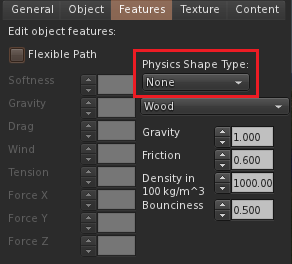
Fortunately, now there’s a better way to make prims phantom: by setting the prim’s Physics Shape Type to “None”. Technically the prim isn’t phantom, but this has the same effect: it allows avatars to walk through the prim. You only need to set this attribute once, and no scripts are required. We recommend that anyone who is using “Phantom Child” scripts to make prims phantom remove those scripts and use this feature instead.

Physics Shape Type

By the way, below the Physics Shape Type dropdown you can see a few other physics settings: Gravity, Friction, etc. These settings aren’t currently used in OpenSim. They might be used in the future, when OpenSim switches from the ODE physics engine to BulletSim.

Failed to find Bodypart in Database

Sometimes when users log-in they get errors such as “Failed to find Bodypart in Database”. These errors are shown when there’s a problem with one of the user’s Wearables (clothes or body parts). We’ve investigated this problem and made some fixes that should reduce the frequency of these errors. One of the reasons that these problems can happen is switching between V1 viewers and V2/V3 viewers, because they use different methods to store Wearables, so making changes in one viewer may not be visible in the other viewer. We’ve improved the situation but it might still occur. Another reason this problem can happen is because of a peculiarity in the way some viewers (such as Firestorm) tell the server when the user has worn or taken off something. We will contact the Firestorm team to ask them to improve this behavior, but for now this cause for the problem remains.

If you encounter this problem then please let us know in the forums, because we can enable additional logging that will help diagnose why this happens. This logging is done per-world, so we would need to know which world you are using.

Telehubs Without Spawn Points

When creating a Telehub, users are supposed to also create at least one Spawn Point. However, this isn’t always done, and telehubs without spawn points prevent teleports into the world (if Allow Direct Teleport is disabled). Since the user’s intent is clear (where they want people to teleport), we now treat telehubs without spawn points as if they have one spawn point in the exact location of the telehub.

Preview of Kitely Market Categories

We are continuing to work on the upcoming Kitely Market, and we would like to get your feedback on our categories tree and attributes. We’ve discussed them with the Kitely Mentors Group over the past few weeks and now we feel that they’re ready for broader review. If you have any comments then please discuss them in the forum. (The forum works better for extended discussions than commenting in the blog).

Items in the Kitely Market are organized into categories. Categories are groups of similar items, e.g. Shoes or Bridges. At the same time, items can also have attributes that describe them: for example, their Color or Material. Typically users first choose the category they want, and then refine their search by selecting some attributes. As an example of how this works, take a look at the Best Buy TV shopping page. In this example the user already chose the category (TVs), and the left side of the screen contains attributes: Screen Size, TV Type, etc.

The use of attributes allows us to make the categories tree relatively simple. For example, we have only one category for Clothing, instead of having categories for Regular Clothes, Wedding Clothes, Goth Clothes, Christmas Clothes, etc. Users who want a specific type of clothing can click on the Clothing category, and then use attributes to specify the type of clothes they want.

When we chose our categories and attributes, an important consideration was what to leave out. For example, consider the Color attribute. It contains only the main colors: Black, Blue, Bronze, Brown, Gold, Grey, Green, Orange, Pink, Purple, Red, Silver, White, Yellow. Having a limited number of options makes searching easier, because users can see similar items together. As another example, consider the Theme attribute: Arabian, Asian, Fantasy, Historical, Modern, Sci-Fi, Steampunk, Western, Other. Although other themes could be added, our goal is to provide values that match about 80% of the themes that people use. We don’t want to provide 100% of the possible themes because then there would be too many options to choose from. Note that users can still use the regular search field to search for any word that appears in the product’s description, even if it doesn’t have an explicit attribute. Having said all that: if you think that another category or attribute is needed then please let us know, but keep in mind that there is value in limiting the possible options.

Some categories and attributes are Adult-only, and will only be shown to users with an Adult maturity level. These categories and attributes have a star (“*”) after their name and are marked in brown.

Attributes

This is the list of attributes we intend to use. Most attributes can be used only with specific categories, and the categories tree below shows which attributes apply to which categories.

All of the attributes are optional: merchants don’t have to specify values for the attributes. However, we recommend specifying attribute values when appropriate to make it easier to find items in the market.

  • Color: Black, Blue, Bronze, Brown, Gold, Grey, Green, Orange, Pink, Purple, Red, Silver, White, Yellow
  • Movement: Static, Flexible, Animated, Interactive
  • Department: Boys, Girls, Men, Women, Unisex
  • Avatar Type: Animal, Anime, Fantasy, Furry, Human, Machine, Object, Plant, Weefolk
  • Environment: Land, Sky, Space, Water
  • Breedable: Yes, No
  • Rideable: Yes, No
  • Gesture: Yes, No
  • Tattoo Style: Biker, Celtic, Erotic *, Funny, Gothic, Military, Tribal, Spiritual, Other
  • Hair Type: Facial, Long, Body *, Short
  • Hair Color: Black, Blonde, Blue, Brown, Grey, Green, Orange, Pink, Purple, Red, White
  • Skin Color: Light, Tan, Dark, Other
  • Clothing Style: BDSM *, Bridal, Business, Casual, Formal, Goth, Holiday, Maternity, Pirate, Uniform, Other
  • Clothing Material: Cotton, Fur, Jeans, Latex, Leather, Silk, Suede, Synthetic, Wool, Other
  • Building Material: Bone, Earth, Fabric, Feathers, Fire, Fur, Glass, Leather, Leaves, Liquid, Metal, Plastic, Scales, Stone, Wood, Other
  • World Size: 1 Region, 2×2 Regions, 3×3 Regions, 4×4 Regions
  • Sound Type: Ambient, Creature, Human, Machine, Nature, Object
  • Theme: Arabian, Asian, Fantasy, Historical, Modern, Sci-Fi, Steampunk, Western, Other
  • Art Theme: Abstract, Erotic *, Creatures, Landscape, People, Objects
  • Furniture Use: Bathroom, Bedroom, Dining Room, Erotic *, Kitchen, Living Room, Nursery, Office, Outdoor, Rec Room
  • Occasion: Birthday, Hanukkah, Christmas, Easter, Halloween, Independence Day (US), Kwanzaa, Mardi Gras, New Year’s Day, St Patrick’s Day, Thanksgiving, Valentine’s Day, Winterfest, Wedding

Categories

Our categories tree appears below. In each category, the first item indicates which attributes apply in that category. For example, items in the Clothing category support the following attributes: “[Color, Movement, Department, Clothing Style, Clothing Material, Theme, Occasion]“.

Attributes that appear in a category automatically apply to all of its subcategories as well. In addition, sometimes subcategories add attributes of their own. In that case, we use a “+” sign as a reminder that these attributes can be used in addition to the attributes in the parent category. For example, the Avatar Skins subcategory shows “[+ Skin Color]” in the first line. This means that the Avatar Skins category supports all the attributes of its parent category Avatar Appearance (“[Department, Avatar Type]“), and in addition it also supports the Skin Color attribute.

Avatar Appearance

  • [Department, Avatar Type]
  • Avatar Shapes
  • Avatar Skins
    • [+ Skin Color]
  • Cosmetic Enhancements
    • [+ Color]
    • Ears and Tails
    • Feet and Hooves
    • Genitalia *
    • Horns and Antlers
    • Face and Body Make-Up
    • Nail Polish
    • Wings
  • Eyes
    • [+ Color]
  • Hair
    • [+ Hair Color, Hair Type]
    • Hair Textures
  • Tattoos
    • [+ Color, Tattoo Style]
  • Avatar Component Bundles
    • [+ Color]
  • Complete Avatars

Avatar Accessories

  • [Color, Movement, Department, Theme, Occasion]
  • Armors and Shields
  • BDSM Accessories *
    • BDSM Collars *
    • BDSM Cuffs, Leashes and Restraints *
    • BDSM Whips, Crops and Paddles *
  • Belts
  • Canes, Staves and Wands
  • Furry Accessories
  • Glasses
  • Hair Accessories
  • HUD Attachments
  • Handbags, Backpacks and Briefcases
  • Hats, Gloves, and Scarves
  • Jewelry and Watches
    • Anklets and Leg Jewelry
    • Belly Jewelry
    • Bracelets
    • Brooches
    • Crowns & Tiaras
    • Earrings
    • Jewelry Sets
    • Necklaces
    • Nose Rings and Piercing Jewelry
    • Rings
    • Watches
  • Masks
  • Neckties
  • Other Avatar Accessories

Avatar Animations

  • [Occasion, Gesture]
  • Animation Bundles
  • Animation Overrides
  • Combat Animations
  • Couples Animations
  • Dancing Animations
  • Emotive Animations
  • Erotic Animations *
  • Posing Animations
  • Sitting and Lying Animations
  • Walking and Running Animations
  • Other Avatar Animations

Clothing

  • [Color, Movement, Department, Clothing Style, Clothing Material, Theme, Occasion]
  • Clothing Textures
  • Clothing Bundles
  • Dresses
  • Footwear
    • Boots
    • Shoes
    • High Heels
    • Sandals and Flip-Flops
    • Slippers
    • Sneakers
    • Socks and Stockings
    • Other Footwear
  • Jackets and Coats
  • Outfits
    • Pants Outfits
    • Shorts Outfits
    • Skirt Outfits
  • Pajamas and Underwear
    • Lingerie *
    • Lounge and Sleepwear
    • Underwear
  • Pants
    • Capris
    • Long
    • Shorts
  • Shirts
    • Blouses
    • Corsets
    • Halters
    • Long Sleeved
    • Short Sleeved
    • Sweaters
    • T-Shirts
    • Tanks and Camis
    • Tube Tops
  • Sportswear
  • Swimwear
  • Skirts
  • Vests

Creatures

  • [Color, Movement, Environment, Breedable, Rideable]
  • Amphibians
  • Humans and Humanoids
    • Babies
  • Birds
  • Fantasy Creatures
  • Insects
  • Machines
  • Marine Animals
  • Mammals
  • Reptiles
  • Other Creatures

Creature Items

  • [Color, Movement, Building Material, Theme, Occasion]
  • Accessories and Toys
  • Food and Energy Supplies
  • Furniture
  • Houses and Habitats
  • Other Creature Items

Structures

  • [Color, Movement, Building Material, Theme]
  • Agricultural Buildings
  • Commercial Buildings
  • Educational Buildings
  • Entertainment Buildings
  • Government Buildings
  • Industrial Buildings
  • Landscaping Structures
  • Military Buildings
  • Parking and Storage
  • Religious Buildings
  • Residential Buildings
  • Transit Stations
  • Other Structures

Furniture

  • [Color, Movement, Building Material, Theme, Furniture Use]
  • Beds and Hammocks
  • Bookcases and Shelves
  • Chairs and Sofas
  • Chests and Cabinets
  • Tables

Interior Design

  • [Color, Movement, Building Material, Theme, Occasion]
  • Appliances
  • Decor
    • Aquariums
    • Books and Periodicals
    • Clocks
    • Decorations
    • Dressing Screens
    • Cut Flowers and Potted Plants
    • Miniature Display Vehicles
      • Boats
      • Cars
      • Motorcycles
      • Planes
      • Trains
    • Mirrors
    • Pottery and Ceramics
  • Electronics
    • Audio Systems
    • Computer Equipment
    • Televisions
  • Entertainment
  • Fireplaces
  • Industrial Equipment
  • Lab Equipment
  • Lighting
    • Candles
    • Chandeliers
    • Lamps and Lanterns
    • Outdoor Lighting
    • Torches
  • Office Equipment
  • Rugs and Carpets
  • Showers, Tubs, Pools and Saunas
  • Window Treatments

Art

  • [Color, Movement, Theme, Art Theme, Occasion]
  • Drawings and Paintings
  • Glass Art
  • Graphics
  • Greeting Cards
  • Photos
  • Picture Frames and Easels
    • [+ Building Material]
  • Posters
  • Sculptures and Statues
    • [+ Building Material]
  • Tapestries
  • Wall Art and Murals

Building Components

  • Bridges and Walkways
    • [Color, Movement, Building Material, Theme]
  • Building Aids
  • Doors
    • [Color, Movement, Building Material, Theme]
  • Fences and Railings
    • [Color, Movement, Building Material, Theme]
  • Kits and Templates
    • [Color, Movement, Building Material, Theme, Occasion]
    • Architectural
    • Avatar Accessories
    • Avatar Apparel
    • Creatures
    • Food and Drink
    • Furniture
    • Hair
    • Landscaping
    • Plants and Trees
    • Shoes
    • Shop Decoration
    • Vehicles
    • Other Kits and Templates
  • Signs
    • [Color, Movement, Building Material, Theme, Occasion]
  • Stairs and Elevators
    • [Color, Movement, Building Material, Theme]
  • Textures
    • [Color, Movement, Building Material, Occasion]
    • Animated Textures
    • Clothing Textures
    • Exterior Wall Textures
    • Fantasy Textures
    • Floor Textures
    • Ground Textures
    • Industrial and Urban Textures
    • Interior Wall Textures
    • Plant and Garden Textures
    • Stone Textures
    • Windows and Glass Textures
    • Other Textures
  • Windows
    • [Color, Movement, Building Material, Theme]
  • Other Building Components
    • [Color, Movement, Building Material, Theme, Occasion]

Recreation and Entertainment

  • Adult Entertainment *
  • Bars and Clubs
    • [Color, Movement, Building Material, Theme]
    • DJ Booths
    • Dance Floors
    • Tip Jars
    • Other Bars and Clubs Equipment
  • Contraband *
    • [Movement]
  • Event and Traffic Tools
  • Food and Drink
    • [Color, Movement, Theme, Occasion]
  • Games
    • [Occasion]
  • Musical Instruments
    • [Color, Movement, Theme, Occasion]
  • Sporting Goods
    • [Color, Movement, Theme]
    • Bicycle Equipment
    • Camping Equipment
    • Fishing Equipment
  • Theme and Amusement Parks
    • [Movement, Building Material, Theme]
  • Toys and Video Game Memorabilia
    • [Color, Movement, Building Material, Theme, Occasion]
  • Other Fun Stuff
    • [Color, Movement, Building Material, Theme, Occasion]

Landscaping and Plants

  • Caves, Grottos and Waterfalls
  • Flowers and Plants
    • [Color, Movement]
  • Trees and Shrubs
    • [Color, Movement]
  • Underwater Landscaping
  • Vegetable Gardens

Vehicles

  • [Color, Movement, Building Material, Theme]
  • Aircraft
    • Airplanes
    • Airships and Balloons
    • Helicopters
    • Hovercraft
  • Ground Vehicles
    • Cars and Trucks
    • Heavy Machinery
    • Non-Motorized Vehicles
    • Military Ground Vehicles
    • Motorbikes
    • Other Ground Vehicles
  • Multi-Use Vehicles
  • Water Vehicles
    • Boats
      • Motor Boats
      • Row Boats
      • Sail Boats
    • Waterbikes
    • Submarines
  • Space Vehicles
    • Rockets
    • Space Ships

Sound Effects

  • [Theme, Sound Type, Occasion]

Gadgets

  • Chat Enhancements
  • Multi-Use Gadgets
  • NPC Scripts
  • Particle Effects
  • Pose Stands
  • Security
  • Teleporters
  • Other Gadgets

Weapons

  • [Color, Movement, Building Material, Theme]
  • Explosives
  • Ranged Weapons
    • Bows
    • Cannons
    • Crossbows
    • Handguns
    • Rifles
    • Other Ranged Weapons
  • Melee Weapons
    • Axes
    • Claws
    • Knives and Daggers
    • Pole Arms
    • Swords
    • Other Melee Weapons
  • Other Weapons

Scripts

  • Avatar Augmentation Scripts
  • Building Helpers
  • Business Scripts
  • Communication Scripts
  • Event Helpers
  • Recreation and Entertainment Scripts
    • [Occasion]
  • Scripting Tutorials
  • Vehicle Scripts
  • Weapon Scripts
  • Other Scripts

Business Tools

  • Affiliate Programs
  • Advertising Systems
  • Gift Cards and Vouchers
  • Guides and Tutorials
  • Information Management
  • Rental Systems
  • Retail Displays
  • Vendor Machines

Worlds

(Note: this category will not be available when the market first opens. It will be added later.)

  • [Color, Environment, World Size]
  • Empty Terraformed Worlds
  • Complete Worlds
    • [+ Theme]

We Need Your Feedback

What do you think about these categories and attributes? Please let us know in this thread in our forums.

Categories were updated on 12 Feb 2013 – Learn More

Categories were updated on 26 Feb 2013 – Learn More

Categories were updated on 19 Nov 2020 – Learn More

Better Detection of Idle Users

We rolled out a few more quick updates to follow up yesterday’s large system update.

Better Detection of Idle Users

Due to user requests, we improved our idle user detection system. First, users that are using private IM to chat are now considered active (previously we only checked for public chat). Second, users that are busy scripting are also considered active. (To be precise, we check for the event where a script is saved.)

Canceled the User Referral Bonus

We’ve canceled the user referral bonus. This was a bonus of 200 Minutes that was given to users who brought other users to Kitely. However, we’ve heard from our users that this bonus is of little use and that it can cause frustration so we decided to simplify things by eliminating it. Now bringing your friends over to Kitely is its own reward đŸ™‚

Offline IM Notifications and People Search

We updated our service today with several user-requested features, and infrastructure improvements that are required for the upcoming Kitely Market.

Email Notifications for Offline IM

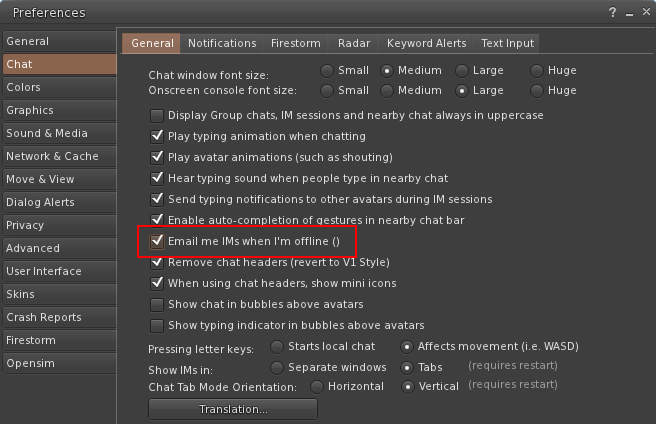
If you receive an IM while you are offline then we’ll send you an email.

To use this feature you must first enable it in your viewer. For example, this is what the option looks like in Firestorm:

IM to Email

People Search

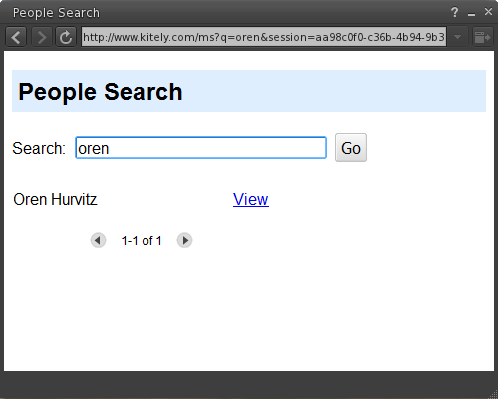
We enabled the “Search” feature in viewers and it now allows searching for avatars.

People Search

Better Support for Uploading Many Items

We’ve had reports of users who were disconnected for being idle while uploading a large number of items using Second Inventory. We now recognize when items are being uploaded and consider the user to be active (not idle) while that is happening.

“Likes” in the Forums

We updated the forums to allow users to “Like” posts. This is done by clicking the Thumbs Up button:

Like Post

The list of all the people who Liked a post is displayed under that post.

Website Improvements

We made a number of improvements to our website. These improvements only affect modern browsers that support HTML5: Chrome, Firefox, Safari, and IE10. Most of our users (86%) use such browsers. The remaining users use mostly IE9, which doesn’t support HTML5, so for them the website will continue working as before. We will continue supporting IE9 as long as it’s widely used.

The most important change is that we made the website faster. This is particularly noticeable when moving from the Public Worlds or My Worlds page to a World Page and back.

Another change that you might notice is that our URLs look different: they no longer contain the hash character (“#”). For example, the URL of our public worlds page changed from https://www.kitely.com/#!search to https://www.kitely.com/search. This change makes it easier for search engines such as Google to index our site.

Kitely Market Early Bird Promotion

We are currently developing an advanced content marketplace. Since most OpenSim users are familiar with the Second Life marketplace, we asked our users what they like and don’t like about it. Using these insights we intend to deliver a great user experience that addresses the main usability issues with existing online marketplaces. At first the market will be used only for buying and selling inside the Kitely grid, but eventually it will be used for selling to multiple grids from a single online shop.

In order to attract good content creators we are now offering various benefits for merchants that bring their content to our market before it opens to the public.

How the Kitely Market will Work

The basic operation of the Kitely Market will be similar to existing marketplaces: merchants create Products using items in their inventory. Users browse the products and purchase them. Products are delivered directly to the buyer’s inventory.

One of the biggest problems with existing marketplaces is the rigid categories. First, sometimes items don’t fit exactly into a single category. Second, there’s a lot of duplication in the list of categories: e.g., the Second Life marketplace includes categories such as “Rings”, “Jewelry Sets”, “Valentine’s Day Jewelry” and “Wedding Rings” which makes it hard to find all the nice gold rings without visiting all of these categories. To solve these problems, the Kitely Market will use attributes. Attributes are properties of the product: for example, “Woman’s” and “Gold”. This makes the list of categories shorter because, for example, we only need one category called “Rings”, and then the attributes can be used to drill down into the various types of rings. This is how most big e-commerce websites work, e.g. Amazon, and we are bringing this useful feature to the OpenSim world.

Another problem with existing marketplaces is that there are many similar products. For example, a merchant that creates a blouse might offer it in five different colors, and each of them is a separate product. This makes it difficult for users to browse the available products because there are only a small number of unique products in each page of results. To solve this, we will be using variations. Each product can have multiple variations, based on color, material, etc. In the example above, there will be just one product for this blouse (e.g., “Mary’s Stylish Blouse”), and five variations: one for each color. When searching the products in the marketplace the product will appear just once instead of five times. All of the product’s variations are counted together for reviews and sales ranking. Again, this is something that already exists in big e-commerce websites but is missing from the Second Life marketplace.

Our listing fees will be:

  • Add product: 100 KC
  • Add variation: 25 KC

(Note that Kitely doesn’t charge content upload fees so you can import as many assets as you want into your inventory for free)

Another significant feature of the Kitely market is that we will add a new permission flag to objects: the Export flag. This flag will only be available for items bought from the marketplace, but not for items bought in-world. Items that have the Export permission can be taken out of the Kitely grid. Currently this will allow items to be included in OAR exports, and later it will allow the items to be used on other Hypergrid-enabled grids. This means that a user will be able to buy an outfit in the Kitely Market and, if the merchant gave it the Export permission, have it available when they hypergrid to other grids. Alternatively, a user whose “home base” is OSGrid will be able to buy an outfit (or any other item) for use in OSGrid.

Products in the Kitely Market can be sold using both Kitely Credits and US dollars. Kitely will charge a 10% transaction fee on content sales. Purchases made using US Dollars are paid directly into the merchant’s PayPal account (without going through Kitely), therefore PayPal’s fees will also apply.

NOTE: the following sections are now outdated and kept here for archive purposes only. Please continue reading our newer blog post about the Kitely Market Early Bird Promotion.

Early-Bird Discounts for All Merchants

There will be a 50% discount on listing fees until the market opens for buyers.

In addition, we will provide a special free world that registered merchants (see below) can use for creating their objects. Since we don’t charge upload fees, this means that even users using the Free Plan will be able to create items without any cost except for the listing fees. This world will only be available until the marketplace opens.

Additional Benefits for Featured Merchants

The discounts described above are available to anyone that creates content for the Kitely Market. But in addition, we have another tier of benefits for a limited number of big merchants. These benefits are as follows:

Free listing of products and variations until the marketplace opens. (I.e., we waive the 100 KC / 25 KC listing fees completely.)

The merchant’s store logo will be displayed on the Kitely Market homepage for one year from the date the marketplace opens.

We will create an official always-on free-access shopping world, tentatively called the “Kitely Plaza”. Each Featured Merchant will receive a free 2000m parcel with 3000 prims to build their shop in this world. This parcel will be rent-free for at least one year.

Finally, Featured Merchants will be eligible to participate in monthly fashion shows in the Kitely Plaza.

Criteria for Featured Merchant Consideration

You must upload at least 200 unique high-quality products (not variations) to the Kitely Market before April 1.

You must have been selling for a minimum of three years in Second Life and/or a well known OpenSim grid.

Since space in our homepage and shopping world is limited, only about 20 merchants will be eligible for these benefits.

Notes

Once the year is over Kitely will reallocate the parcels in the Kitely Plaza based on marketplace sales performance. We may rent some of the spaces in an auction, and/or allocate some spaces in a lottery between qualifying Kitely Market merchants.

The Kitely Plaza will be made available to Featured Merchants 3 weeks before we open the Kitely Market so they’ll have time to build their in-world shops.

Fashion shows will only be held if at least 3 Featured Merchants participate in them.

We may give Featured Merchant status to people who don’t pass the aforementioned requirements but have other good qualifications. If you have outstanding content but don’t meet these requirements then please contact us and let us know.

Since we are early in the development cycle for the Kitely Market, we may decide to change some aspects of its behavior or fees. However, the discounts and benefits described here will still apply.

How to Apply

Send us an email with your Kitely avatar name and the approximate number of unique content items you intend to upload to the Kitely Market before it opens, and you’ll get the 50% discount and access to the content-creation sandbox.

If you want to apply to be a Featured Merchant then include the following additional information in your email: the name you go by in other grids (if different from Kitely), and a SLURL and/or link to a website where we can view your content. We will notify you by email whether you were accepted or not. This will happen before we make the merchant control panel available, so that you’ll know which listing fees you will need to pay (if any).

Weekly Merchant Meetings

Kitely will hold weekly meetings for merchants where you’ll be able to ask questions and have a say on how the Kitely Market develops. Times and dates will be announced later. In addition, you can use our forums at any time.

Act Now

We will make the Kitely Market’s merchant control panel available in about 1.5 months. However,  you shouldn’t wait for that: you can start uploading your content to Kitely immediately, so that it’s already in your inventory once the control panel is available. Having a lot of high-quality content in your inventory will increase your chances of gaining Featured Merchant status.

Fixed OpenSim Sun and Physics Bugs

We updated the service today with several bug fixes to the way the sun works in OpenSim, and fixed a physics bug related to sculpties.

The Sun

Each region and estate in OpenSim can have their own sun settings. These settings determine whether the sun is fixed in one place or moves throughout the day, and if it’s fixed then at what hour. Each region can furthermore specify whether to use its own sun settings, or the settings in the estate.

Note that the distinction between region and estate settings is only useful for worlds that contain more than one region. In such worlds, if you set all the regions to use the estate’s sun then you can easily change the sun for all the regions at once. However, in 1-region worlds this distinction is less important because it’s the same amount of effort to change the settings in the estate or in the region.

We fixed a bug that prevented the setting “Use Estate Sun” from working. This is the setting that says that the region declines to set its own sun settings but instead wants to use the estate’s settings.

We fixed another bug that occurred when moving between regions that have different sun settings. The proper behavior is that every time the avatar enters a region, the sun immediately changes to the settings used in that region. But before we fixed this bug, in some cases the sun remained on the settings of the previous region.

A combination of these bugs could cause the following “interesting” behavior: when a user moves between regions, the sun suddenly changes position, and after a few seconds returns to the previous position. We became aware of this bug thanks to Ener Hax who demonstrated it here: http://iliveisl.com/megaregion-environmental-time-issue-video/.

Sunset in Eoliah Village

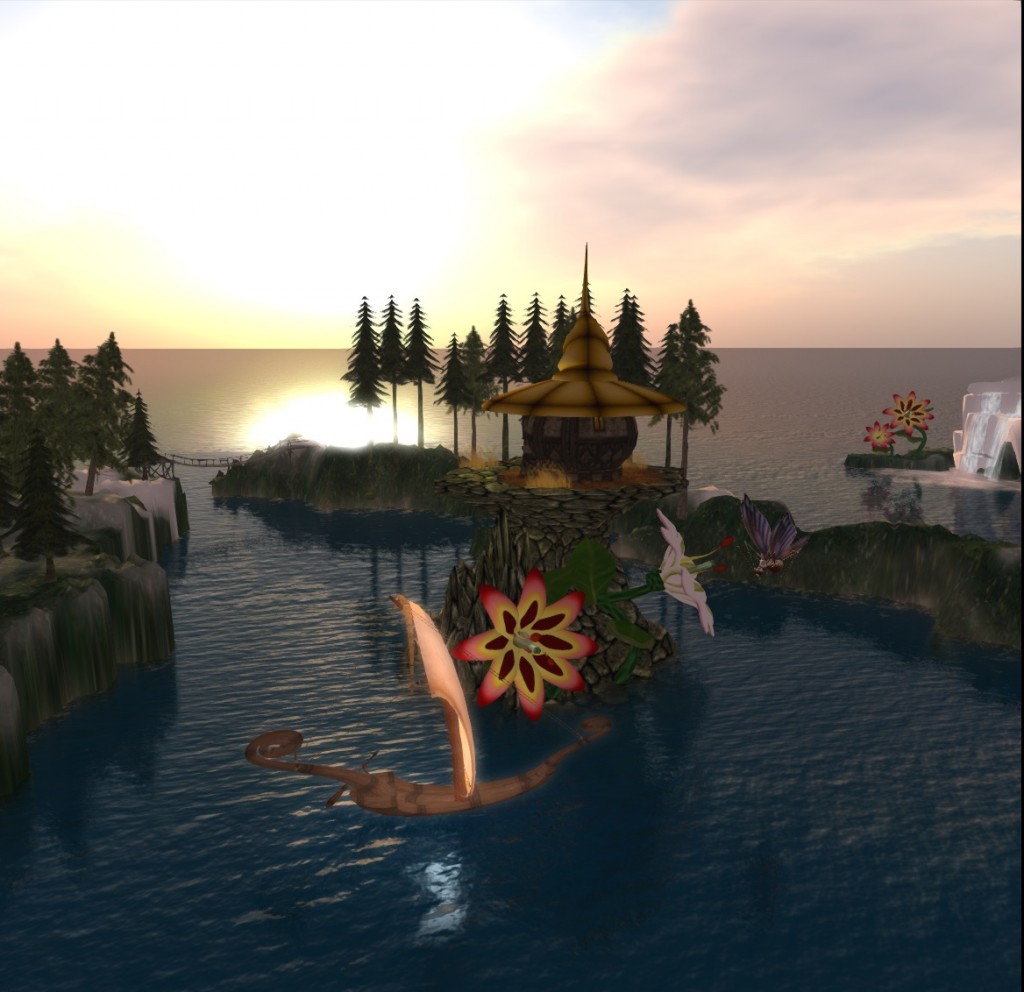
The final change we made related to the sun is actually a new feature, and not a bug fix. From now on, if your world is in Advanced Megaregion mode and you change the sun settings in any region then this change will automatically affect all of the regions in the world. This saves time because you don’t have to go to each region separately and change it. If you do want different sun settings in each region then disable Advanced Megaregion mode; change each region as you wish; and then re-enable Advanced Megaregion mode.

(If you’re interested in changing the sun position using scripting then see Change the sun settings using OSSL in the Kitely forum.)

Scupltie Physics

We fixed a bug (reported here) that sometimes caused scuplties to have the wrong physics shape. The sculpties’ physics shape was stuck on the basic shape (sphere, cube, etc.) instead of matching the sculptie’s appearance.

New Kitely Forums with Single Sign-On

We’ve improved Kitely today with a new, easy-to-use forums system, and several improvements to OpenSim and our website.

Kitely Forums

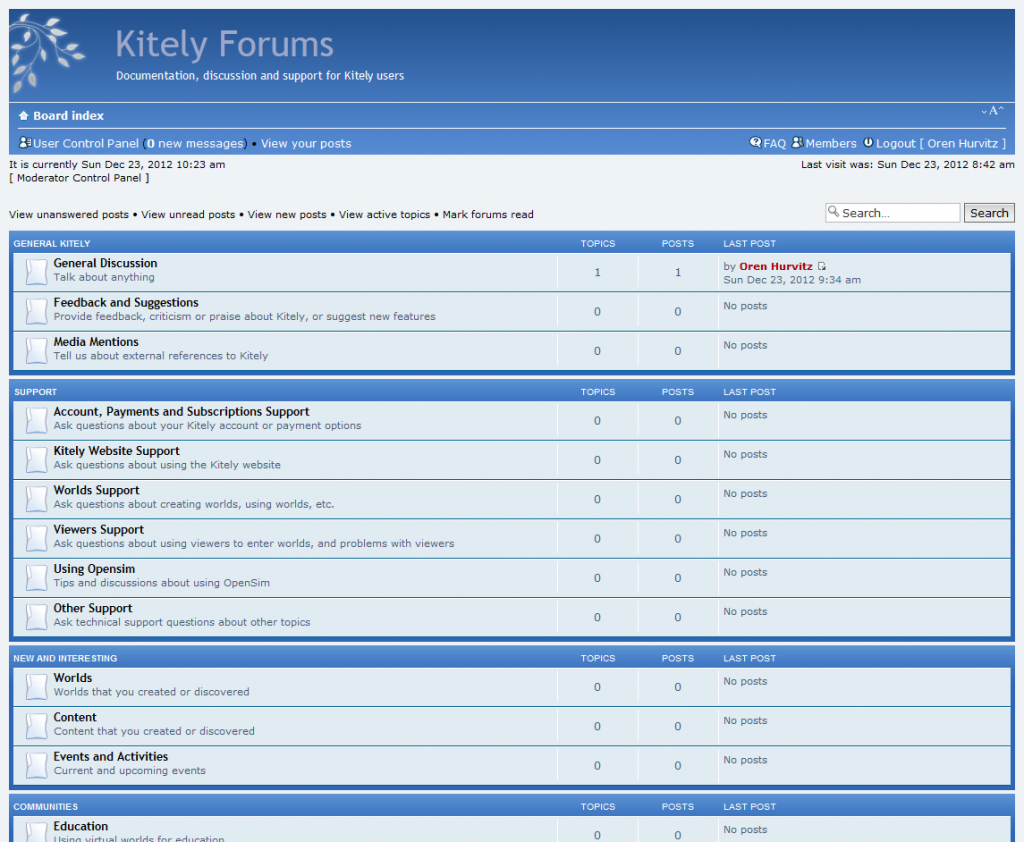
Ever since we started our beta, people have been asking us to create user forums to make it easier to connect to other Kitely users. We’re happy to announce that as of today, the Kitely forums are officially open and located here: http://forums.kitely.com

Kitely Forums

To make it easy to use the forums, we’ve implemented a single sign-on system: any user that is logged in to the Kitely website is automatically logged in to the forums as well. We hope that this will make the forums a convenient place for discussions among the Kitely community. Please visit the forums now and introduce yourself!

You have the option to “subscribe” to individual forums, and if you do so then you’ll get an email notification whenever someone posts something to those forums. We encourage you to subscribe to the forums that interest you and become an active participant.

Our previous support site is now deprecated, so please switch to posting your support questions in the new forums. We’ll keep the old support site up for a few more months, since it contains information that may still be useful, but eventually it will be shut down. If you’ve previously posted information which you think is still relevant to other Kitely users then please repost it in the new forums.

We would like to acknowledge the efforts of two Kitely users: Margaux Lapointe and Dot Macchi, who have been kind enough to setup their own Kitely user forums when we had none. Despite being “under the radar” these forums have been quick to attract passionate users and produce great discussion. Dot’s forum in particular, http://forum.kitelyusers.net/, showed us how much good a forum can do and pushed us to add an official Kitely forum. Thank you Margaux and Dot!

Choose World Wind Settings

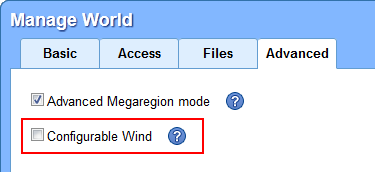
In one of our recent updates we changed the default type of wind used in OpenSim from “Random Wind” to “Configurable Wind”. We did so at the request of some of our users, but since then we’ve been told by other users that they prefer to use Random Wind. We’ve therefore added a checkbox that lets you select which type of wind to use in each of your worlds. All existing worlds are now using Random Wind by default, so wind behavior will return to what most people are used to. If you rely on Configurable Wind in your world then please make sure to enable it.

Improvements to OpenSim

We’ve implemented the ability to return objects from the Top Colliders and Top Scripts dialogs. This feature simply hadn’t been implemented in OpenSim yet, so we added it, and submitted it for inclusion in regular OpenSim as well. This should not be confused with the ability to return all the objects that belong to a particular user; that feature has always worked.

The following two OpenSim improvements rely on our proprietary cloud-based infrastructure and will therefore benefit Kitely users only:

Sometimes offline users appeared as online to their friends. This problem should appear much more rarely now, and will repair itself automatically after a while.

Some of our users encountered a problem where they had accidentally created a prim with a size of zero in one or more of its dimensions. Such prims are extremely difficult to delete because viewers don’t allow selecting them. We’ve added a self-fixing mechanism to Kitely: whenever a world is started we find such prims and change their size from 0 to 0.001. That is enough to make it possible to select those prims in the viewer, and edit or delete them.

Removed Support for Internet Explorer Versions 8 and Below

As of today, we no longer support IE version 8 and below. These old IE versions were used by just 0.05% of our visitors, so this change will have a minimal impact. However, supporting those old browsers was a chore so dropping support will let us focus our efforts on more modern browsers.

Other Improvements

We added a section called “My Subscription” to the Settings page. This makes it easier for users to see their subscription status at a glance. That information was previously found in the “Get Credits” dialog, but that placement was counter-intuitive so we moved it to a more prominent location.

Kitely Is Now Significantly Faster than Regular OpenSim

We updated Kitely today with system improvements that make Kitely perform significantly better than regular OpenSim: worlds start faster, assets appear more quickly, and lag after login has almost been eliminated.

Worlds Start Faster

Kitely worlds are not always on, so sometimes they need to be started when someone enters them. Kitely was already much faster at starting worlds than regular OpenSim, and today we improved startup times even more, especially for complex worlds.

Assets Appear More Quickly

Kitely’s cloud-based asset system had already provided superior performance to regular OpenSim’s assets service. We’ve spent the last few weeks optimizing it further and now it performs even better, especially in serving textures to viewers.

Significant Improvements to Login Lag

Entering an OpenSim region is often accompanied by noticeable lag while OpenSim downloads assets and inventory. This lag affects everyone in the region; not just the user that entered. Our newly improved cloud-based assets and inventory systems almost eliminate this lag, providing unparalleled responsiveness when entering a world. Try moving around when you just entered a world to experience this for yourself!

Important Note Regarding These Optimizations

The aforementioned login-time optimizations require some preparation for each world. These preparations will run automatically the first time you start the world. This means that the optimizations will only take effect starting with the second time that the world is started.

Other Improvements

Following user requests, we added an option to remove a world’s picture. You can find this feature in the Advanced tab of the Manage World dialog: next to the picture you’ll now see a link called “Remove picture”.

Following another user request, we added Angstrom to the list of viewers that the Kitely Plugin supports.

World pictures now appear faster in the Public Worlds page, enabling you to see the search results page with less waiting.

New Cloud-Based Inventory System

We rolled out a new cloud-based inventory system today, which offers significantly better performance than the regular OpenSim inventory service. The new system leverages the infrastructure we’ve created for our cloud-based asset system. This continues our commitment to providing unique features and improved performance over regular OpenSim grids.

Our new inventory system provides several benefits:

  • Avatars enter worlds faster, and experience less lag while inside.
  • Avatars that are already in a world experience less lag when someone else enters the world.
  • Opening large inventory folders is much faster.

Additional Changes

We changed the wind module to Configurable Wind. This was requested by some of our users, as it’s used for sailing simulations. Use osSetWindParam to change the wind’s behavior.

Following another user request, we added a confirmation dialog when you export a world to help you avoid starting this time-consuming process by accident.

A Minute of Your Time Can Help the Kitely Community Grow

Hypergrid Business is now holding its third annual OpenSim grid survey.  Last year many of you participated in the survey, and your support helped Kitely grow and become the biggest commercial provider of OpenSim regions. Please help us continue to expand the Kitely community by answering this short multiple choice questionnaire. Thank you!